:format(webp))
:format(webp))
Tailwind CSS vs Bootstrap: which one fits your project (and your team)?
Read this and you’ll be able to pick the right CSS approach for your next project. I cover what each framework is, the practical trade-offs you’ll feel day to day, and five long-term factors top articles miss: maintainability over years, design tokens and multi-brand theming, fit with component ecosystems, how teams actually collaborate around each approach, and adoption trends that matter if the project must last 5+ years.
What Bootstrap is, in plain terms
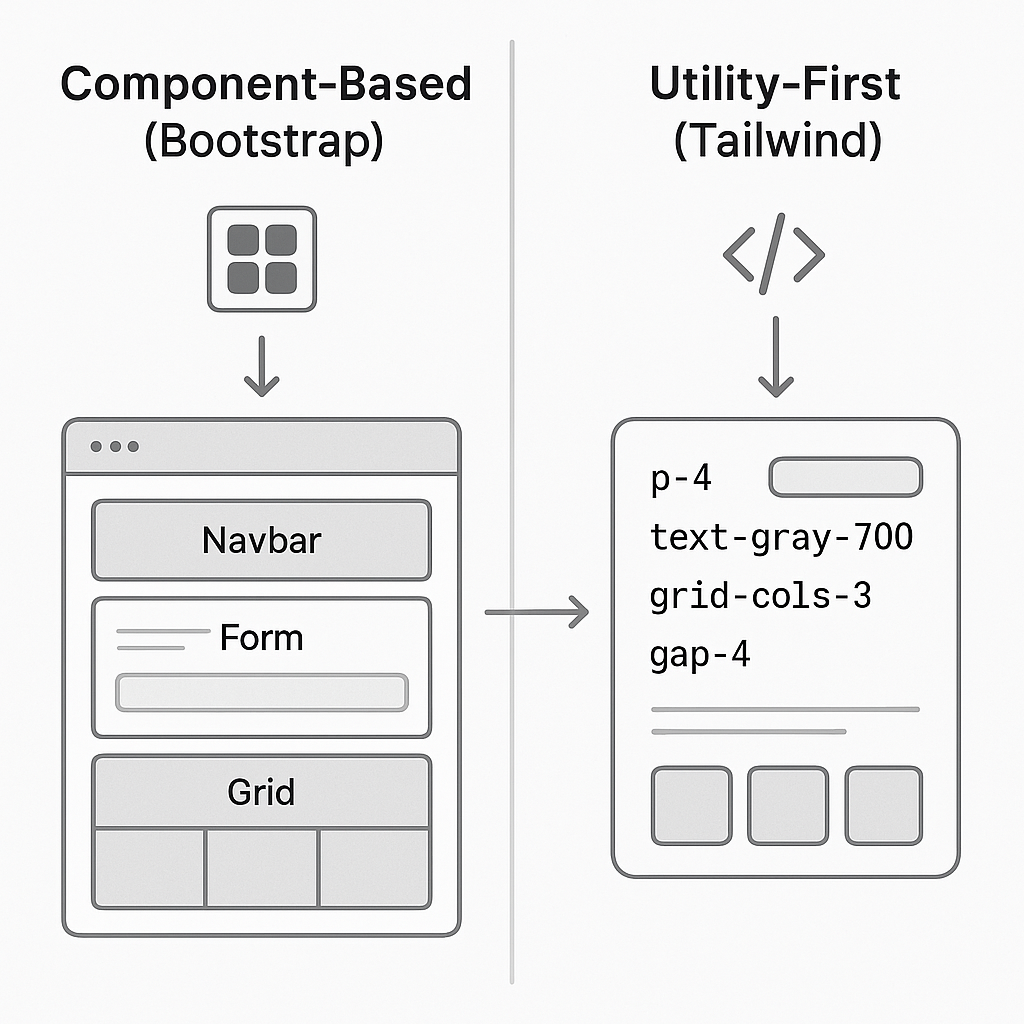
Bootstrap is a component-first CSS framework that provides prebuilt UI components (navbars, forms, modals, grids) plus a responsive grid and utility helpers so you can assemble interfaces quickly. You get ready-made styles and predictable markup patterns straight from the official Bootstrap documentation .
What Tailwind CSS is, in plain terms
Tailwind is a utility-first framework: instead of prebuilt components, it gives you small, single-purpose CSS classes (for example, `p-4`, `text-gray-700`, `grid-cols-3`) that you combine directly in your markup to build any design. The project docs explain the utility-first philosophy and how the system is configured—see the Tailwind CSS utility-first documentation .
The core difference: component-based vs utility-first
At a high level, Bootstrap ships components you use as-is or lightly customize; Tailwind gives you primitives to compose your own look. That leads to different workflows:
Bootstrap favors copy-pasteable components and consistent defaults.
Tailwind favors composition from small classes and centralized configuration (`tailwind.config.js`).
Short checklist you can use right now
Need fast prototypes and consistent, opinionated UI out of the box? Bootstrap.
Building a custom brand or design system that must look unique? Tailwind.
Expect lots of design changes across many apps? Read the maintainability section below.
When | Recommended Framework |
|---|---|
Need fast prototypes and consistent, opinionated UI out of the box? | Bootstrap |
Building a custom brand or design system that must look unique? | Tailwind |
Expect lots of design changes across many apps? | Consider long-term maintainability (Tailwind) |
Learning curve and developer experience
Bootstrap is easy to pick up if you understand HTML — you apply classes and get components. Tailwind’s vocabulary (many small utility classes) takes a bit of practice, but tooling (IntelliSense extensions, JIT builds) speeds development once you know the conventions.
File size and production optimization
Tailwind can generate a very large stylesheet during development because it includes many utility classes, but its production build uses tree-shaking (removing unused classes via tools like PurgeCSS ), so the shipped CSS can be tiny. Bootstrap ships a compiled stylesheet you can use via CDN or build into your bundle; if you include the full bundle you may carry styles you don’t use—check out the minified file size on cdnjs.com to see typical payloads.
Advantages and trade-offs — quick summary
Bootstrap advantages: fast prototyping, lots of prebuilt components, familiar to many teams and common in enterprise projects. See LogRocket’s analysis of Tailwind CSS vs Bootstrap for more context.
Bootstrap trade-offs: styling opinions are baked in and larger overrides can be awkward when you need a brand-unique UI.
Tailwind advantages: extreme design flexibility, centralized theme configuration, and small production CSS when purged.
Tailwind trade-offs: different markup style (more classes inline) and an initial habit change for teams not used to utility classes.
When Bootstrap commonly makes sense
Bootstrap is a strong fit when you need predictable components, fast prototypes, or you’re working with teams that prefer copy-able, standardized UI patterns—common in CMS projects and many enterprise apps. The component library and wide ecosystem make it fast to deliver consistent pages; see this comparison on Bits and Pieces .
When Tailwind commonly makes sense
Tailwind shines when you need a custom look, are building a design system, or want to co-locate styling with components in modern JS frameworks. Its config file becomes the single source of truth for spacing, colors, and tokens. Many teams also pair it with headless component libraries like Headless UI .
How each approach behaves in 2–3 year old codebases (maintainability and refactoring)
Longer projects reveal different forms of technical debt. In practice:
If your team enforces a component library and periodically refactors components, Bootstrap’s component model can stay tidy.
If you want to avoid specificity wars and centralize design tokens, Tailwind’s config + extraction patterns usually result in clearer long-term ownership—assuming the team commits to extraction and conventions.
Design systems and design tokens: which maps better?
Design tokens (colors, spacing, typography scales) are the backbone of multi-brand systems.
Tailwind: tokenization is first-class via the central config (theme) and works well with CSS variables for runtime theming.
Bootstrap: tokens exist (Sass variables, CSS variables in v5), and Bootstrap is commonly customized by changing core Sass variables or building custom themes.
Fit with modern component ecosystems (React, Vue, Svelte, Angular)
Modern component architectures influence how you want styles to live.
Tailwind integrates naturally with co-located styles inside components and pairs with headless libraries.
Bootstrap has mature component wrappers like React-Bootstrap and ng-bootstrap , letting you consume Bootstrap patterns via framework components rather than raw markup.
How team composition and collaboration change with each approach
With Bootstrap, non-CSS-heavy developers quickly assemble pages because components behave predictably.
With Tailwind, developers learn a consistent set of utilities; designers benefit from a shared token config and can test variations quickly. Tools like IntelliSense extensions help onboarding.
Code reviews differ too: component-first reviews focus on APIs and props, while utility-first reviews focus on class patterns and extraction; see Refactoring UI’s guidance for best practices.
Adoption trends and future-proofing
If you need a project to last 5+ years, community traction and ecosystem matter.
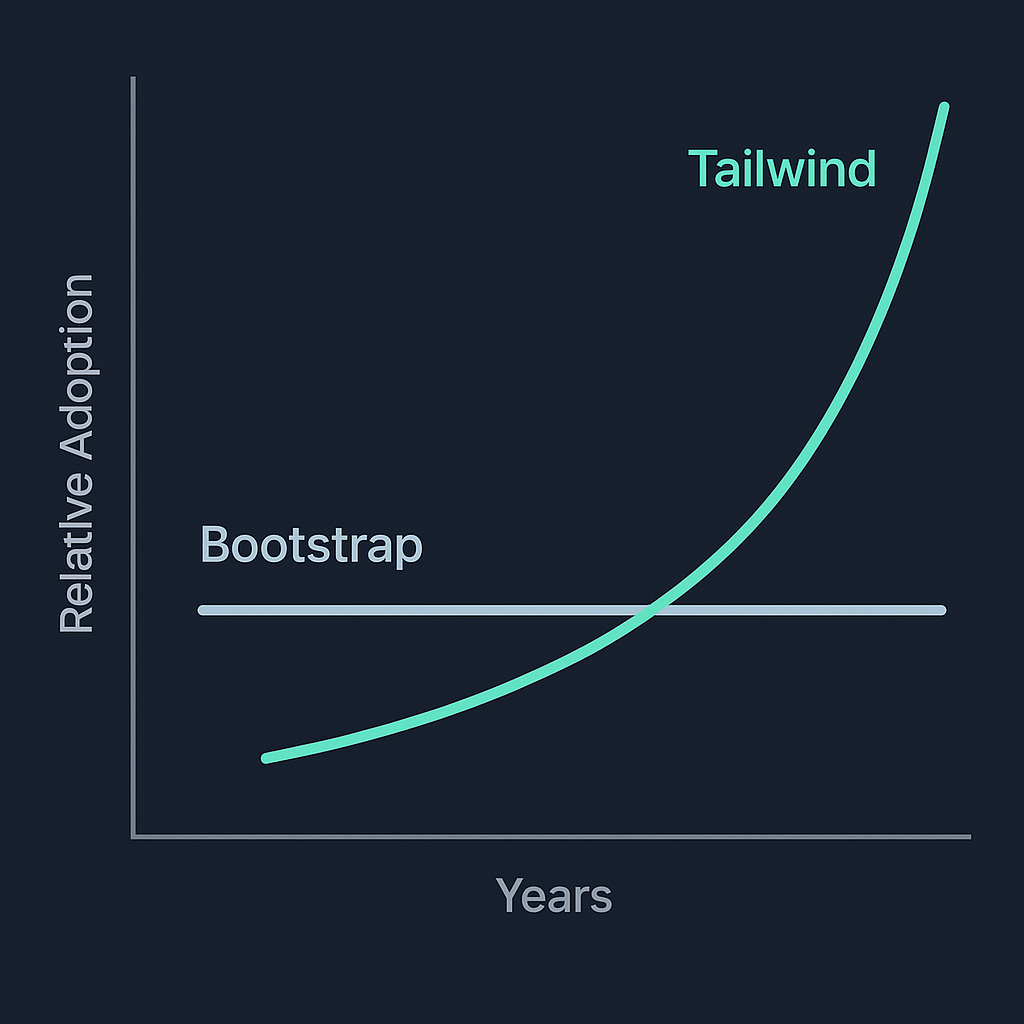
Bootstrap remains widely used across the web and has a long history in enterprise sites and admin panels—see BuiltWith’s framework trends .
Tailwind’s adoption accelerated over recent years and it ranks highly in developer surveys like the State of CSS .
Migration and integration strategies
If you’re not sure, you can mix approaches or phase a migration:
Start Tailwind for new front-end components while keeping older Bootstrap pages running.
Extract shared tokens and component spec documents first, so both frameworks reference the same design decisions.
Practical steps:
Start a small pilot component library using your preferred approach.
Publish tokens (Sass variables or a shared `tailwind.config.js` / CSS variables).
Add integration tests or visual snapshots in Storybook to catch drift—see the Storybook documentation for setup and visual regression workflows.
Final thoughts (what to choose, and why)
If you need fast, predictable UI delivery with minimal upfront design investment, Bootstrap is the pragmatic choice. If you’re building a brand-unique product or a cross-app design system and want token-driven theming with tight control over CSS output, Tailwind is a better fit.
Whichever you pick, invest early in conventions:
Define token ownership and where they’re stored.
Publish a small component library or extraction rules to prevent drift.
Add Storybook or visual regression checks so refactors don’t introduce regressions.
You don’t have to be religious about one approach—pick based on your product goals, team makeup, and how much maintenance you want to shoulder in years two and three. If you want, tell me about your project (team size, expected lifetime, design variability) and I’ll recommend a concrete setup and starter checklist.
:format(webp))
:format(webp))
:format(webp))